
Project Update Presentation
This is a presentation of everything that has been completed in this project so far.
What is the project?
The goal of this project is to compare the reviews of three different products, produced from the same manufacturer and sold by different merchandisers. The manufacturer is Ulker (a leading food company in Turkey famous for its sweet snacks). The products of Ulker can be found on the greatest e-commerce platform in Turkey: Trendyol. Similar to Amazon, you can get the same product from different sellers on Trendyol. We observed that the same product sold by different merchandisers have different concerns on the comments section. Therefore, we wanted to compare the comment section of three different products.
The products:
Progress of the Project
- Identify the products to be used in analysis
- Implement a web scraper to obtain the comments from the website
- Clean and format the data, save and store in Excel files
- Implement a Django Rest Framework API and post the data
- Analyze the data
- Codes Implemented for Web Scraping:
- Utilized Selenium and BeautifulSoup
  # open the browser
  browser = webdriver.Chrome(ChromeDriverManager().install())
  browser.maximize_window()
  browser.get(url)
# load the page and manually sort comments, # then scroll down automatically time.sleep(10) while i < loop: browser.execute_script("window.scrollBy(0, 700);") time.sleep(0.8) i += 1 django_logger.debug(f' Loop number: {i}') html = browser.page_source soup = BeautifulSoup(html, 'lxml')# Get the reviews brand = soup.find('div', class_='seller-name-text') brand_score = soup.find('div', class_='sl-pn') time.sleep(0.8) browser.execute_script("window.scrollBy(0, 400);") time.sleep(1) competitors = soup.findAll('div', class_='merchant-name-container') time.sleep(1) reviews = soup.find_all('div', class_='rnr-com-w')# store data in arrays for r in reviews: django_logger.debug(f' Review number: {i}') i += 1 review_div = r.find_all('div', class_='rnr-com-tx') for r_div in review_div: django_logger.debug(f' Review text: {r_div.text}') revs_arr.append(r_div.text) review_date = r.find_all('span', class_='rnr-com-usr') for r_date in review_date: date_review = r_date.text.split('|')[1] django_logger.debug(f' Review text: {date_review}') dates_arr.append(convert(date_review)) review_shop = r.find_all('span', class_='seller-name-info') for r_shop in review_shop: django_logger.debug(f'store: {r_shop.text}') shops_arr.append(r_shop.text)
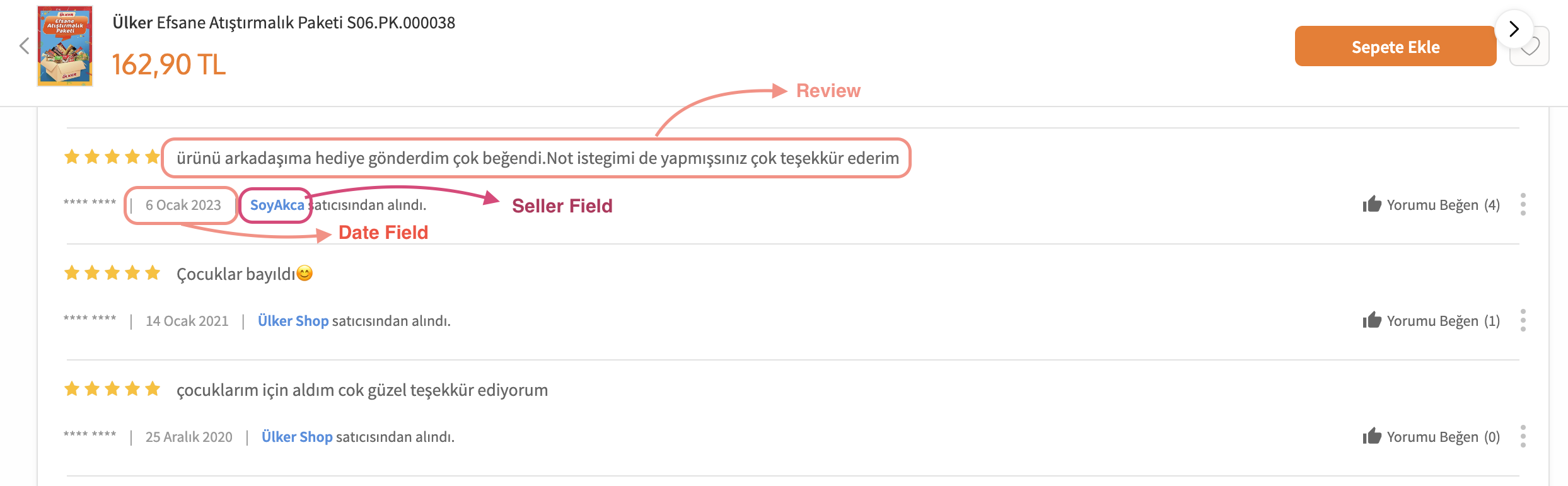
Here is an example screenshot from the comments that were scraped:
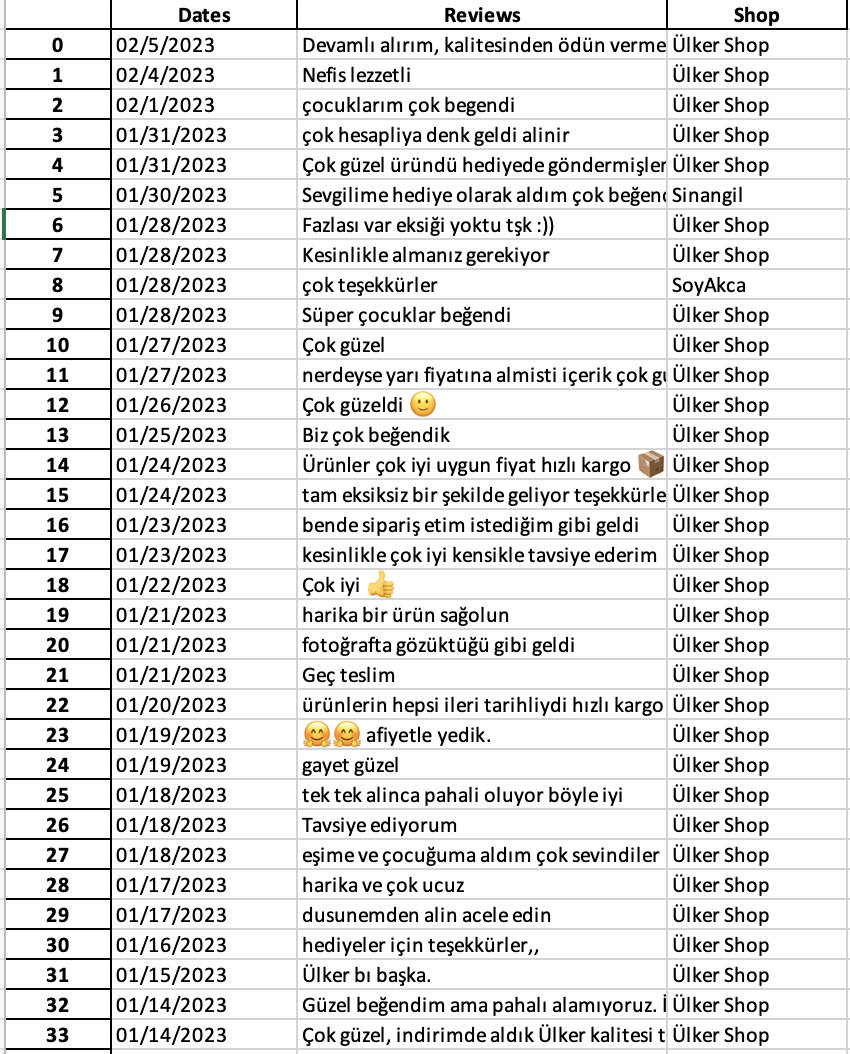
Here is a screenshot showing how the data is stored in Excel Files:
Complications and Problems:
-
Sorting the comments After automatically opening up the browser, we manually have to sort the comments from the drop-down menu. This is necessary to automate the process fully later on in the project.
-
Obtaining the rating of the product in each review The html parsing of the stars are complicated to parse through. Here is a screenshot for how they are represented:
 Each star has an empty and full component, and they are present in both cases. I am now looking for a way to count
the stars that are actually full.
Each star has an empty and full component, and they are present in both cases. I am now looking for a way to count
the stars that are actually full.
Next Steps:
- Build an API to post the data tables
- Any recommendations?
- Automate the process of scraping the data and posting to the API
- Analyze the differences of the data (waiting on further information from my supervisor)